Charger World
Anker USB C Hub, 11-In-1 Docking Station Dual Monitor, 10 Gbps USB-C and USB-A D
Anker USB C Hub, 11-In-1 Docking Station Dual Monitor, 10 Gbps USB-C and USB-A D
Couldn't load pickup availability
Anker USB C Hub, 11-In-1 Docking Station Dual Monitor, 10 Gbps USB-C and USB-A Data Ports, 4K HDMI and Displayport, 85W Power Delivery, 2 Data Ports, Ethernet, for XPS
Description
| Item model number | A8388 |
| Operating System | macOS, iPad OS |
| Are Batteries Included | No |
| Number of HDMI Ports | 2 |
| Wattage | 100 |
| Compatible devices | Laptops, Monitors |
| Item Weight | 136 g |
| Guaranteed software updates until | unknown |
| Brand | Anker |
| Hardware interface | USB Type C |
| Special feature | Fast data transfer, Multi-monitor display, Cargo passthrough |
| Product Dimensions | 13.7 x 5.7 x 1.4 cm; 136.08 g |
| Colour | gray |
| Manufacturer | Anker |
- Powerful expansion: Turn one of your laptop's USB-C ports into 11 powerful features with this docking station, with a 10Gbps USB-C data port, a 10Gbps USB-A data port, a 4K HDMI port, a 4K DisplayPort, a 100W USB-C Power Delivery input port, two 480 Mbps USB-A data ports, an Ethernet port, one AUX port. and microSD-/SD memory card slots.
- RAPIDE DATA TRANSFER: With a 10Gbps USB-C port, a 10Gbps USB-A port, two 480Mbps USB-A ports, and 104Mb/s microSD/SD card slots, you have a huge number of ways to transfer files at high speed with your docking station.
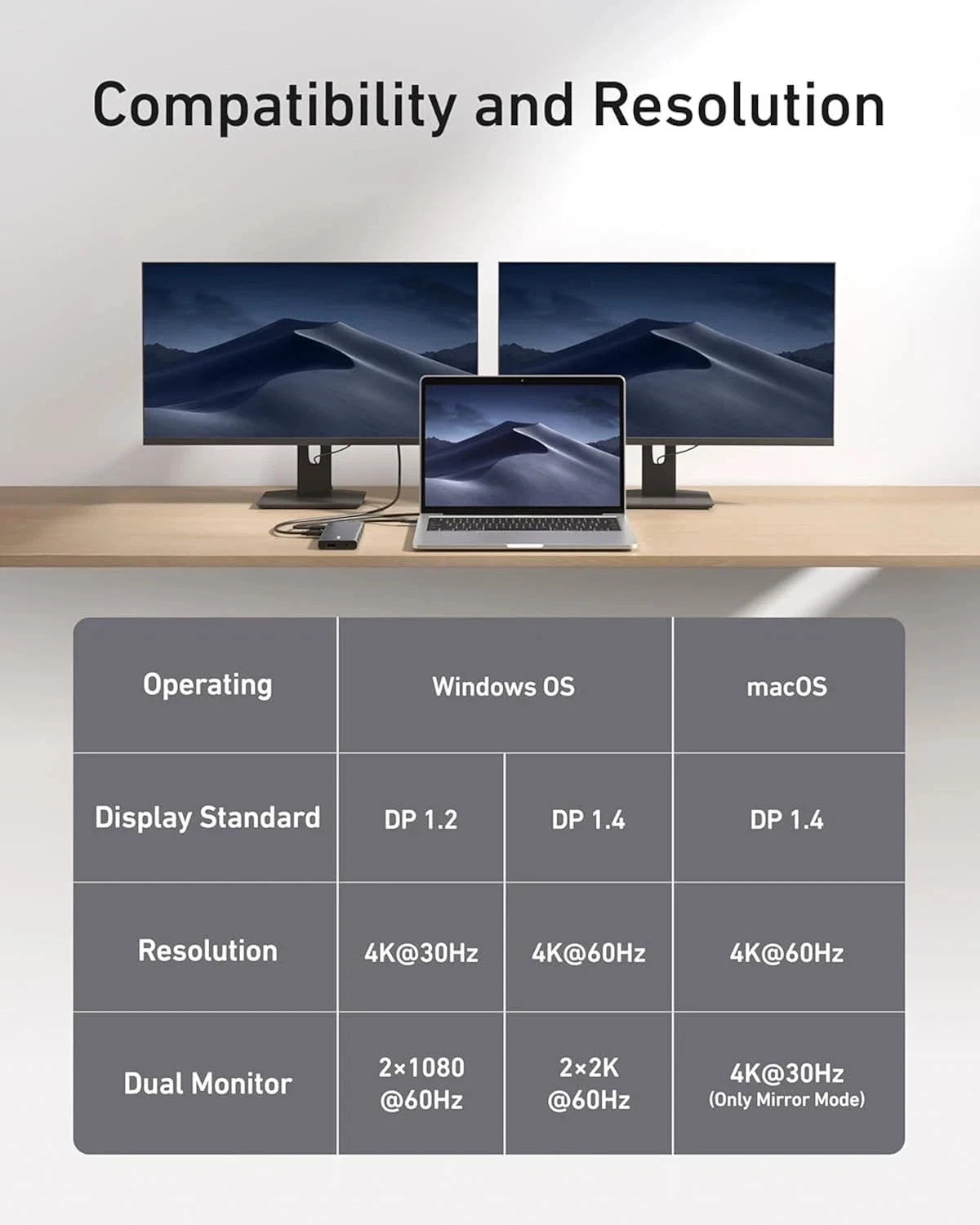
- Multi-monitor display: Simply connect to the DisplayPort and HDMI port to enjoy crystal clear streaming or mirroring over 2 displays at up to 2K at 60Hz with a DP 1.4 laptop or 1080p at 60Hz with a DP 1.2 laptop.
- PASS-THROUGH CHARGING POWER: Supports pass-through charging up to 85W, so you can turn on your laptop and access the other features of the hub at the same time. Note: A charger is required for pass-through charging (not included).
- What you get: a Anker 565 USB-C hub (11-in-1), an instruction manual (English language not guaranteed).
- Note: The hub only supports image output via the HDMI and DisplayPort ports. Image output via the USB-C ports is not possible.
Product Description
Model Number: A8388
Expand Your Port Options: A total of 11 ports give you access to high-speed file transfer, powerful pass-through charging, dual-monitor display, USB connectivity, Ethernet, and audio connectivity—all from a single compact hub.
Note: The USB-A and USB-C ports with mouse, keyboard, and 10 Gbps icons are data-transfer ports only and do not support charging or media display.
Supported Display Modes
Only Windows laptops support displaying different content to multiple screens.
For Windows Laptops: 1. The two connected monitors and your laptop's screen all display different content. 2. The two connected monitors show the same content, while your laptop's screen shows something else. 3.The two connected monitors and your laptop's screen all show the same content.
For MacBooks: 1.The two connected monitors show the same content, while your laptop's screen shows something else.2.The two connected monitors and your laptop's screen all display the same content.
Note:
1.Switching between display modes can be done in your laptop's settings.
2. If you cannot detect the dock after updating to macOS Ventura, please follow these steps: Privacy & Security > Allow accessories to connect.
Share